What Are Wingdings? The Complete Guide to Microsoft’s Mystery Font
Open Microsoft Word, change the font to Wingdings, and type your name. Instead of letters, a row of tiny pictures appears: arrows, hands, stars, smiley faces, envelopes, and strange little ornaments. It looks like a secret code — and in a way, it is. This is Wingdings, Microsoft’s famous “mystery font,” and it has fascinated computer users for more than three decades. But what are Wingdings, really, and why do they still matter?
So what are Wingdings? In short, Wingdings is a dingbat font — a symbol font in which every letter key on your keyboard produces a picture instead of a letter. It was designed by professional typographers, licensed by Microsoft in the early 1990s, and shipped with Windows to give everyday users easy access to decorative symbols and icons. This complete guide explains everything: what the symbols are, who created the font, how it works in Word, how the different Wingdings versions compare, and how you can read and write Wingdings yourself in seconds.
What Is the Wingdings Font?
When people ask what are Wingdings exactly, the simplest answer is that it is a symbol font: a typeface whose characters are pictures rather than letters. The Wingdings font is a TrueType symbol font that replaces the standard alphabet with a set of 224 graphic symbols. When Wingdings is active, pressing the “A” key does not produce the letter A — it produces a symbol. Every key on the keyboard, from letters to numbers to punctuation marks, maps to a different picture. For an independent technical overview of the font’s encoding, see the Wingdings article on Wikipedia. If you are still wondering what are Wingdings at a technical level, see Microsoft’s typography documentation for the TrueType specification behind the font.
Key fact: The name Wingdings is a blend of “Windows” and “dingbats” — the typographic term for the small decorative glyphs (bullets, arrows, stars, asterisks) that printers have used for centuries to ornament pages.
Because Wingdings is a font and not a picture library, its symbols behave exactly like text: they can be resized, colored, bolded, copied, and pasted. That is why the font became so popular for homemade newsletters, party invitations, school worksheets, and office memos in the 1990s.
What Do the Wingdings Symbols Look Like?
To truly understand what are Wingdings made of, look at the symbol categories. The 224 Wingdings characters fall into several recognizable groups:
Smiley faces and expressions
Wingdings includes a full cast of faces: smiling, frowning, winking, surprised, and neutral expressions. These were the emoji of the 1990s — long before emoji existed on phones, people typed Wingdings faces to add emotion to documents.
Arrows
There are dozens of arrows in every direction and style: thick arrows, thin arrows, double-headed arrows, curved arrows, and arrows inside circles and boxes. These made Wingdings genuinely useful for diagrams and instructions.
Hands and fingers
Pointing hands (like the classic “pointing finger” used in old printed books), thumbs up, peace signs, and open palms appear on many keys. The pointing hand has been a typographic tradition since the 1400s.
Geometric shapes
Squares, circles, triangles, diamonds, stars, and pentagons in filled and outline versions. These were perfect for bullet points, checkboxes, and decorative dividers.
Everyday objects
Envelopes, telephones, scissors, pencils, books, folders, clocks, keys, bells, and flags. Whole tiny illustrations hide behind ordinary letter keys.
Ornaments and flourishes
Decorative borders, asterisks, snowflakes, and leaf-like flourishes that could dress up a page the way clip art would — without needing any graphics software.
Zodiac and religious symbols
The twelve zodiac signs, crosses, stars of David, and other traditional emblems round out the collection, giving the font its slightly mystical reputation.
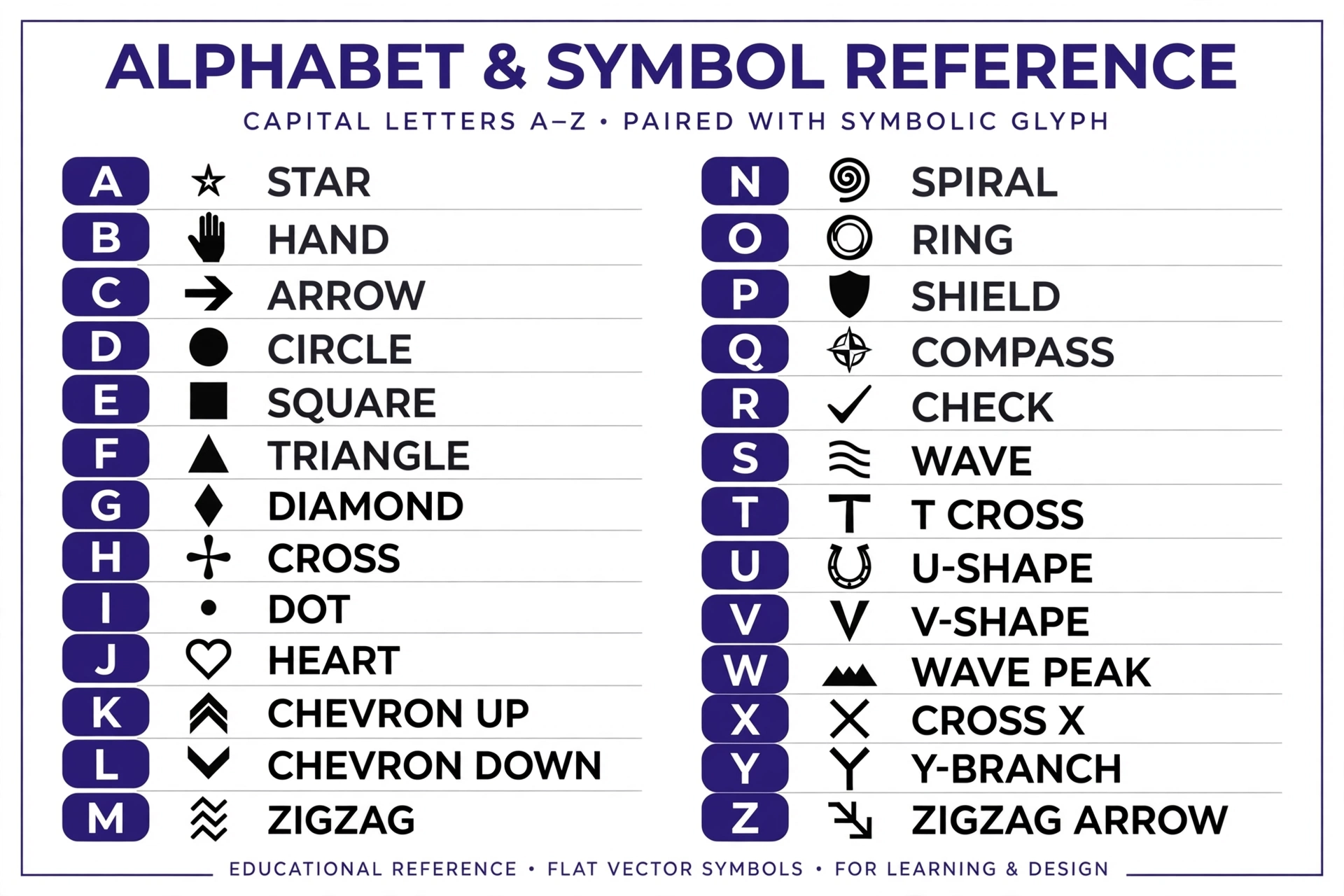
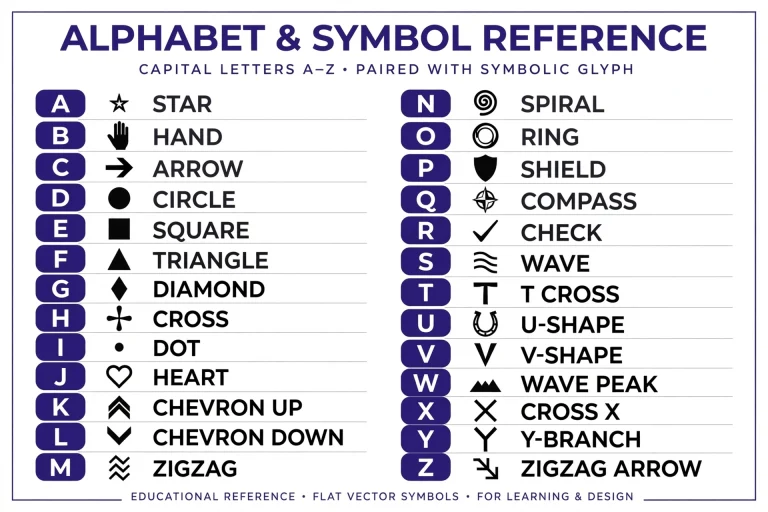
To see every symbol mapped to its keyboard key, browse our complete Wingdings chart. For an independent reference, Alan Wood’s detailed Wingdings character chart maps every symbol too.
A Brief History of Wingdings
Despite looking like a Microsoft in-joke, Wingdings was created by two of the most respected type designers in the world: Charles Bigelow and Kris Holmes. The pair founded their studio, Bigelow & Holmes Inc., in 1978 and became famous for the Lucida typeface family — one of the most widely used font families in computing history.
Alongside Lucida, Bigelow and Holmes designed sets of symbol fonts called Lucida Icons, Lucida Arrows, and Lucida Stars. In 1990, Microsoft licensed these designs to bundle with the brand-new TrueType font technology it was launching. Microsoft combined the three symbol sets into a single font, renamed it “Wingdings,” and shipped it with Windows 3.1 in 1992. Anyone asking what are Wingdings today is looking at the same designs Microsoft licensed over thirty years ago.
Did you know? Wingdings also attracted internet folklore — including the famous (and false) claim that typing “NYC” in Wingdings predicted a real-world tragedy. It was simply a coincidence of symbol assignments, and Microsoft has debunked it.
The font was an instant hit. Millions of Windows users suddenly had a built-in library of symbols, and Wingdings quickly became a staple of home and office documents throughout the 1990s. Microsoft later released Wingdings 2 and Wingdings 3, with additional symbols, and commissioned a companion web-oriented symbol font called Webdings from designer Vincent Connare in 1997. You can read the full story in our article on who created Wingdings.
How Wingdings Works in Microsoft Word
Using Wingdings in Microsoft Word is simple, and the same technique works in most Windows programs:
- Change the font: Select your text (or just place the cursor), open the font dropdown, and choose “Wingdings.” Everything you type now appears as symbols.
- Type normally: Each letter key produces a fixed symbol. For example, typing the alphabet in order gives you a tour of envelopes, faces, and shapes.
- Insert individual symbols: Go to Insert > Symbol > More Symbols, set the font to Wingdings, and double-click the symbol you want.
- Use Character Map: Open the Windows Character Map app, select Wingdings, click any symbol to see its keyboard key, then copy and paste it.
Important: if you type a message in Wingdings and send it to someone whose computer substitutes a different font, they will see plain letters instead of symbols. Wingdings is a presentation of text, not an encryption — the underlying letters are still there.
Wingdings vs Wingdings 2 vs Wingdings 3 vs Webdings
If you are still asking what are Wingdings 2 and 3, here is the answer: Microsoft’s symbol font family grew over the years. This comparison shows how the four main fonts differ:
| Font | Released | Designer | What’s inside |
|---|---|---|---|
| Wingdings | 1992 | Bigelow & Holmes | 224 symbols: faces, arrows, hands, shapes, objects, ornaments, zodiac |
| Wingdings 2 | 1992 | Bigelow & Holmes | More office symbols: checkmarks, crosses, boxed numbers, extra arrows |
| Wingdings 3 | 1993 | Bigelow & Holmes | Almost entirely arrows: directional arrows for diagrams and flowcharts |
| Webdings | 1997 | Vincent Connare | Web-themed icons: globes, computers, cameras, internet imagery |
The original Wingdings remains the most famous by far, but Wingdings 2 is the one to reach for when you need a checkmark or a ballot box — its symbols were designed specifically for forms and lists. Most people who ask what are Wingdings mean this original 1992 set.
What Are Wingdings Used For Today?
Wondering what are Wingdings used for in the modern era? The font is no longer anyone’s default, but it has found a lively second life:
- Video games and puzzles: The character W.D. Gaster in the game Undertale “speaks” in Wingdings, which introduced the font to a whole new generation. Fans use our Gaster translator to decode his dialogue.
- Puzzles and ARGs: Puzzle hunts, escape rooms, and alternate-reality games use Wingdings as a lightweight cipher.
- Secret notes: Kids (and playful adults) still pass notes in Wingdings, readable only with a key or decoder.
- Design and nostalgia: Retro designers use Wingdings ornaments for 90s-style graphics, and the symbols work as simple icons in documents.
- Teaching: Teachers use Wingdings symbols for worksheets, matching games, and visual rewards.
How to Read and Write Wingdings
By now, the question of what are Wingdings should be fully answered — but the best way to understand the font is to try it yourself. The easiest way to read or write Wingdings today is with a free online tool. Our Wingdings translator converts text to Wingdings symbols instantly — no font installation needed, and it works on phones, tablets, Macs, and PCs. Paste Wingdings text in to decode it, or type normal text to encode it.
If you want to look up individual symbols, the Wingdings chart shows every character mapped to its keyboard key, so you can type symbols directly in Word or any program with the font installed.
Frequently Asked Questions
What are Wingdings in simple terms?
Wingdings is a symbol font for Windows where each keyboard key types a picture — such as a face, arrow, or star — instead of a letter. It was designed by Charles Bigelow and Kris Holmes and has shipped with Windows since 1992.
Is Wingdings a real language?
No. People who ask what are Wingdings sometimes assume it is a secret language, but it is not a language at all and has no grammar or vocabulary. It is simply a font that displays symbols in place of letters; the underlying text is still ordinary English (or whatever you typed).
Can I use Wingdings on my phone?
Phones do not include the Wingdings font, so the easiest method is an online translator. Our Wingdings translator works on any phone browser and converts text to symbols you can copy and paste.
Why is Wingdings so mysterious?
Because unreadable symbols look like a secret code, Wingdings has attracted conspiracy theories and puzzle uses for decades. Its appearance in the game Undertale as the “language” of a mysterious character added to the mystique.
What is the difference between Wingdings and Webdings?
Wingdings (1992, by Bigelow & Holmes) contains general symbols like faces and arrows. Webdings (1997, by Vincent Connare) was designed for the web era and contains internet-themed icons like globes and computers.
What are Wingdings examples in Word?
Typical examples of what are Wingdings used for in Word include checkmarks in to-do lists, arrows in flowcharts, and stars as decorative bullets.
What are Wingdings good for today?
People who ask what are Wingdings good for today are often surprised: the symbols still work perfectly for print worksheets, party invitations, and classroom materials.
Try the Free Wingdings Translator
Now that you know what are Wingdings, try it yourself. Type any text and watch it transform into Wingdings symbols — or paste Wingdings text to decode it instantly.